SASSA biometric verification proves you are the person on the application, usually by scanning your face through a link on your phone. SRD applicants may be asked to do it online. If you have no smartphone or data, visit a SASSA office and ask for help.
Contents (22 topics)
- If SASSA asks you to verify, why now?
- How does the identity check work?
- What do you need before you start?
- How do you complete the face scan?
- Why does the face scan fail?
- What if the verification link never arrives?
- How can you verify without a smartphone?
- Can a family member or friend help?
- What happens after you verify?
- What happens if you ignore the request?
- How do you spot a fake verification request?
- Is your face data safe?
- What if you have a basic phone only?
- Should you change details while verification is open?
- What if you think someone else verified or applied as you?
- How do you plan an office visit that works?
- What should you do after a lost or stolen phone?
- How can you help an older or less confident person verify?
- Which questions should you ask SASSA?
- Tips for passing the face check
- Frequently Asked Questions
- Your best next step
If SASSA asks you to verify, why now?
You are usually asked because SASSA needs to confirm that you, and not someone else, control the application. It is a protection against fraud and wrong payments.
According to SASSA's 2026 booklet:
- all new SRD applicants must complete a facial check before the grant can be approved;
- referred applicants must log in, request a link and complete the check;
- people changing their cellphone number must pass facial recognition;
- some people who are approved but not paid must request a link and complete it.
A request is therefore not proof that you did something wrong.
How does the identity check work?
It is an identity check based on features of your body, such as your face or fingerprints. For SRD, you will mostly meet the facial version, often called eKYC (electronic Know Your Client).
Your live face is compared with the record held for your ID number. You may also be asked to show your ID document to the camera.
| Process | Who meets it | How it is usually done |
|---|---|---|
| SRD identity check | SRD applicants who are asked | Link opened on a phone |
| Biometric enrolment | Grant applicants and beneficiaries when SASSA requires it | In person at SASSA, often with fingerprints |
| e-Life Certification | Beneficiaries confirming they are alive | SASSA online services portal |
These are separate processes. Finishing one does not prove you finished another.
What do you need before you start?
Gather everything first, because a link can time out while you search.
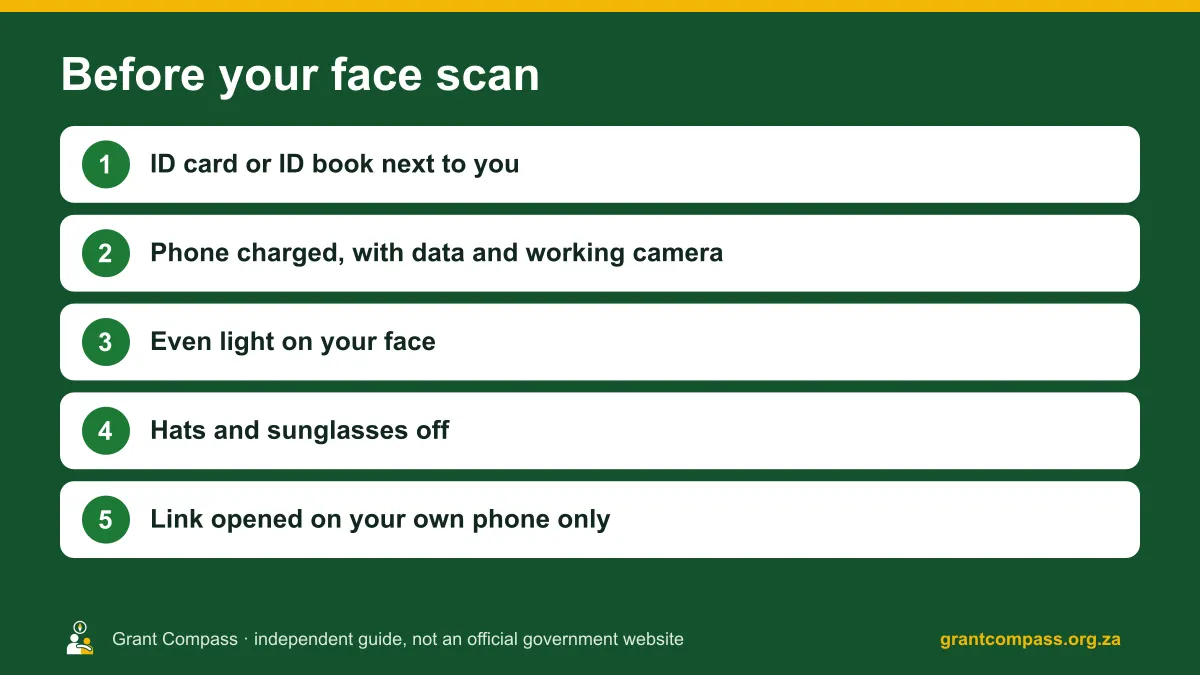
- Your South African ID card or book, or the identity document you applied with.
- A smartphone with a working front camera.
- Data or Wi-Fi that stays connected.
- A charged battery.
- The phone number registered on your application.
- A bright, quiet spot with a plain background.
You may borrow a trusted person's phone if the portal allows it. Sign out and delete saved photos afterwards.
How do you complete the face scan?
Request the link yourself on the official portal, then follow the screen prompts without rushing.
- Type https://srd.sassa.gov.za into your browser.
- Open your application with your ID number and phone number.
- Choose the verification option and request a link.
- Open the link from your SMS or screen.
- Read the consent message.
- Allow camera access.
- Photograph your ID if asked, with all edges visible.
- Hold your face inside the guide shape.
- Follow instructions such as turning or looking straight ahead.
- Wait for the completion message.
The link is personal. SASSA has referred to a 72-hour limit for verification links, so use it soon and never forward it.
Afterwards, check your status after some days using the SRD status check.
Why does the face scan fail?
Most failures come from the picture, the phone, the connection or the record behind your ID. Work out which before you try again.
| What you notice | Possible cause | What to try |
|---|---|---|
| "Face not detected" or similar | Poor light or angle | Face the light and hold the phone level |
| Blurry picture | Dirty lens or shaky hands | Wipe the lens and rest your elbows |
| Page freezes | Weak connection | Move to better signal |
| Camera will not open | Browser permission blocked | Allow the camera in settings, or use another browser |
| Scan completes but fails | Photo on record does not match well | Ask SASSA, check your ID record |
| Link says expired | Too much time passed | Request a new link |
The exact message may differ from these examples. Copy yours word for word.
Can an old ID book cause failure?
Yes, it can. SASSA has said that people with the green ID book are more likely to fail facial matching, because older stored photos can be poor. It advised getting a new smart ID card if the test fails.
What if the verification link never arrives?
Check your number and signal, wait a short while, then ask again. If it still does not come, get help instead of requesting it all day.
- Restart the phone and clear old messages.
- Confirm the number on your application is the SIM you are using.
- Check that the SIM is active and not blocked.
- Try again at a quieter time of day.
- Call 0800 60 10 11.
SASSA has also explained that links may not go out when the identity service it relies on from Home Affairs is unavailable. That is outside your control, so try again later.
If you no longer have your old number, read Changing your number without an OTP. Missing login codes are covered in Fixes for a missing OTP.
How can you verify without a smartphone?
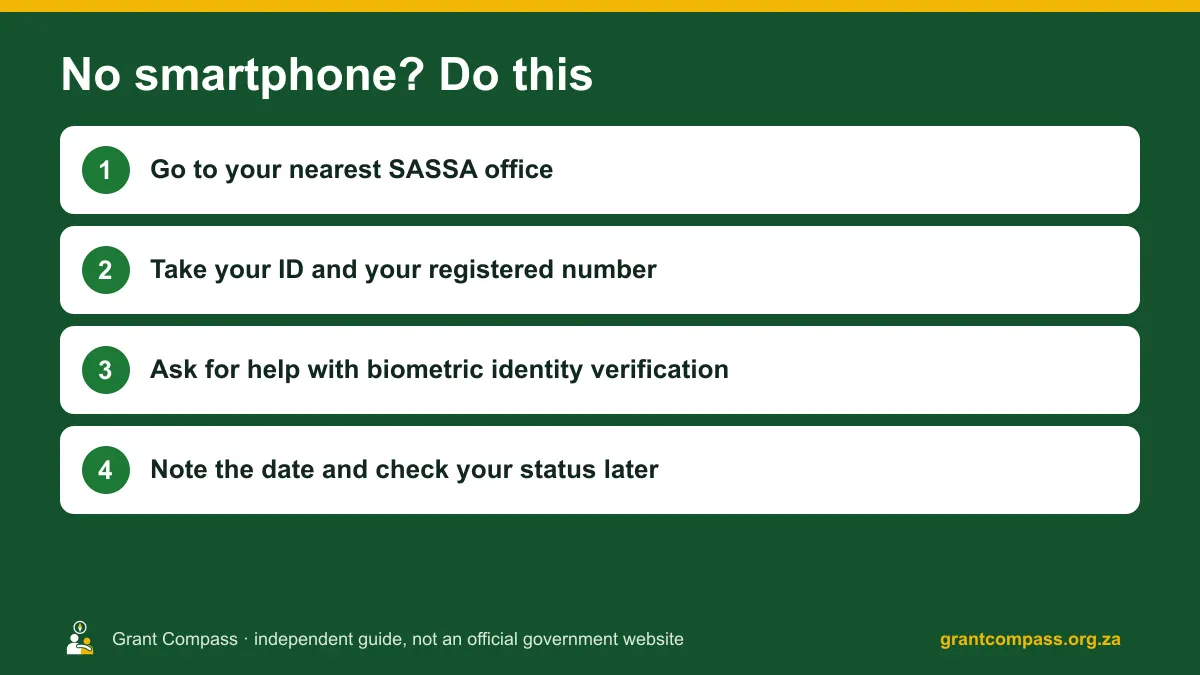
Go to a SASSA office. In January 2026 SASSA asked SRD beneficiaries without smartphones, laptops or data to visit local offices for help.
The agency said offices could assist using kiosks, official laptops or guest Wi-Fi. What is available can differ by office and day.
What should you take?
- Your ID document.
- Your basic phone with the registered SIM, because an SMS may be needed.
- The SMS or status wording that asks you to verify.
- Any proof of a lost or replaced SIM.
- A pen and paper for a reference number.
What should you say at the desk?
Say: "I need help with biometric identity verification for my SRD application. I do not have a smartphone." Then ask what will happen next and when to check your status.
What if the office cannot help that day?
Ask for the name of the office or day when help is available. Note the date you visited. Find nearby options with our SASSA offices guide.
Can a family member or friend help?
Yes, someone you trust can help you read instructions or hold the phone, but the face must be yours.
Pick a person you know well. Do the scan together, watch the screen, and keep your codes to yourself where possible. Never let anyone keep your ID, bank card or PIN. Do not accept help from strangers outside offices or paid points.
If you cannot manage your own affairs because of illness or disability, ask SASSA about a procurator. See Who can collect for you. A procurator arrangement does not mean they can fake your scan.
What happens after you verify?
SASSA updates your record and continues its normal checks. Verification does not approve the grant by itself.
| What you see later | Meaning | Next step |
|---|---|---|
| Pending | Checks continue | Wait and check again |
| Approved | Month passed | Confirm banking details |
| Declined | Another rule or record failed | Read the reason and appeal if wrong |
| Same request again | Result may not have saved | Contact SASSA with your attempt date |
Our guides cover Pending months, Failed or referred results and Identity verification problems.
What happens if you ignore the request?
The step it relates to may stay blocked. A new application may not be approved, a referred case may stay referred, or a change may not go through.
Do not rely on the request disappearing. If you cannot do it online, use the office route and keep a note of your effort. Ask SASSA what happens to affected months.
How do you spot a fake verification request?
Check that it matches something on your official status and that you can reach it from the official site. When in doubt, do not tap.
| Safer sign | Warning sign |
|---|---|
| You requested the link yourself | A link arrives from nowhere |
| Address is a sassa.gov.za page you recognise, or shown on the portal | Strange spelling or shortened address |
| No payment asked | A fee to verify or release money |
| No PIN or password asked | Requests bank PIN, CVV or password |
| Calm instructions | Threats and urgent pressure |
SASSA says it will never request a PIN. Report suspected fraud on 0800 701 701. If you gave away bank details, call your bank immediately.
Is your face data safe?
Only give it through the official process, and read the consent screen. Your face photo and ID images are sensitive information.
Do not post screenshots of the scan or your ID. Delete copies from a borrowed phone, including the photo gallery and downloads. Close the browser when you finish. If you suspect someone verified in your name, report it and ask SASSA to check your application.
What if you have a basic phone only?
Plan for an office visit, because the facial check needs a camera and a browser. A basic phone still matters, since SMS codes may go to it.
Keep it charged and keep its SIM. Bring it when you ask for help. If a staff member uses an official laptop or kiosk, check that your own number is the one on your application. Do not let anyone change it without explaining why.
You can still check your status with USSD on *134*7737# if the service is running. It does not complete a face scan.
Should you change details while verification is open?
Only change details that are wrong or no longer work. Extra changes can create more checks.
SASSA has warned that repeated changes to bank or contact details can delay payments. If your number really has changed, note that SASSA requires facial recognition for the change. Finish one task before starting the next, and keep a record of each.
If your bank account has closed, update it through the official process. See Changing banking details.
What if you think someone else verified or applied as you?
Report it to SASSA straight away and do not delete any evidence. Signs include a status you never applied for, a number you do not know or payments you did not receive.
- Screenshot what you can see.
- Call the fraud line on 0800 701 701.
- Visit a SASSA office with your ID.
- Ask which number and account are on the application.
- Open a police case if money or your identity was taken.
- Tell your bank and change your passwords.
Staff will need to confirm who you are before they discuss the file. That protects you.
How do you plan an office visit that works?
Go early, take your documents and ask one clear question. Offices can be busy, and equipment may be shared.
Phone ahead if you can find a number, and ask whether verification help is available that day. Carry water if you expect to queue. Before leaving the desk, ask whether the check was completed, whether anything else is needed and when to look at your status. Write the answers down.
What should you do after a lost or stolen phone?
Block the SIM with your network first, then get a replacement with the same number if you can. A kept number means codes and links can still reach you.
If the old number is gone for good, use the official process to change it, which includes facial recognition. Do not ask a friend to receive codes for you. Watch your status for changes you did not make, such as new banking details. Report anything strange at once.
| Your situation | First move |
|---|---|
| Phone lost, same number recoverable | Replace the SIM, then request a new link |
| Number lost for good | Start the official number change |
| Phone stolen with banking apps | Call your bank, then your network |
| Borrowed phone used for the scan | Delete photos and sign out |
How can you help an older or less confident person verify?
Sit beside them, explain each screen in their home language and let them make the choices. Patience matters more than speed.
Check that their glasses, hat or head covering will not hide their face. Ask whether any covering can be moved for the picture, and respect what they say. If the scan upsets them or keeps failing, stop and plan an office visit together.
Do not keep their ID, codes or photos on your phone afterwards. Write the date of the attempt on paper and leave that note with them. They should know what was done in their name and where to check the result.
Which questions should you ask SASSA?
Ask questions that get you a clear next action. Vague questions often get vague answers.
- Is a verification still outstanding on my application?
- Which status or month does it affect?
- Did my last attempt reach your system?
- Can I complete it at this office?
- What must I bring if I come back?
- When should I check again?
Take a pen, note the answers and keep any reference number.
Tips for passing the face check
Small changes often make the difference.
- Face the light. Stand near a window with light on your face, not behind you.
- Keep the phone level. Hold it at eye height. Looking down distorts your face.
- Look like your ID. Remove hats, caps and sunglasses. Pull hair away from your face.
- Clean the lens. A smudge can blur the whole image. Wipe it with a soft cloth.
- Sit down. Rest your elbows on a table to stop shaking.
- Close other apps. A slow phone can freeze mid-scan. Free some memory first.
- Avoid peak frustration. After two or three failures, pause and check the cause.
- Record each attempt. Note date, time and message. Staff can use this.
- Replace damaged ID. A cracked or faded document is hard to read. Ask Home Affairs.
- Ask early. Visit an office before a long delay builds up.
Frequently Asked Questions
What is SASSA biometric verification?
It is a check that uses your face or fingerprints to confirm your identity. SRD applicants mostly complete a facial scan through a link on a phone. It helps SASSA stop other people using your ID. Passing it does not approve the grant, because other eligibility checks still apply.
How do I do biometric verification for SRD?
Open the official SRD portal, find your application and request a verification link. Open it on a smartphone, allow the camera, show your ID if asked and follow the face prompts. Wait for the completion message. Then check your status again after a few days.
Can I verify without a smartphone?
Yes, visit a SASSA office for in-person help. In January 2026 SASSA said offices could assist people who lack a smartphone, laptop or data. Take your ID and your registered number. Call ahead if possible, because services and queues differ between offices and days.
Why does my face scan keep failing?
Poor light, a dirty or weak camera, a shaky connection or an old photo on record can all cause failure. Improve the conditions and try again once or twice. If it still fails, visit an office. Green ID book holders may need to apply for a smart ID card.
How long is the verification link valid?
SASSA has referred to acting on the link within 72 hours. Links and systems can change, so open yours as soon as you receive it. If it has expired, go back to the official portal and request another. Do not use a link someone else has sent you.
Is biometric verification free?
SASSA does not ask applicants to pay a fee to verify. You may pay for data or transport. Treat any request for money to verify, unblock or speed up your grant as a warning. Report suspicious people on the SASSA fraud line, 0800 701 701.
Does verification mean my grant is suspended?
No, a request to verify is not the same as a suspension. It means something must be confirmed. A step may wait until you complete it, so act quickly. If your status separately shows suspended or cancelled, read the wording and ask SASSA what it applies to.
Do I need to verify every month?
We found no official rule saying you must scan every month. You are asked when SASSA requires it, for example as a new applicant, when referred or when changing certain details. Follow any new request that appears on your status, even if you passed a check before.
Can I do the scan for my mother or friend?
No, only the applicant can complete their own face scan. You can help them read the instructions and hold the phone steady. If they cannot manage because of illness or disability, ask SASSA what options exist. Never use your face or photos in place of theirs.
What if verification passed but nothing changed?
Give the system some days, then check again. If the same request or referred message stays, call 0800 60 10 11 with the date of your scan, or visit an office. Ask whether the result is recorded and whether another check is holding your month.
Your best next step
If you have a smartphone, request your link from the official portal and finish the scan in good light today. If you do not, plan an office visit with your ID. Check your status afterwards, and follow up if it has not moved.
Sources
- You and Your Grant (SASSA booklet 2026)
- SASSA statement on help with biometric identity verification
- SAnews: SRD grant beneficiaries urged to verify identity to avoid delays
- SAnews: SASSA to introduce biometric enrolment
- GroundUp: Why people with green ID books struggle with verification

About The Author
Michael Williams is an informational content writer focused on South African social grants, SASSA services and public assistance information.
Keep Reading