A SASSA status failed or referred message means something could not be confirmed, or your case needs extra checking. Referred applicants must log in to the SRD portal, request a link and complete a facial check. For a failed result, find out which step failed before you try again.
Contents (15 topics)
- If your screen shows Failed or Referred, which one is it?
- How do Failed and Referred compare with other results?
- Why would SASSA refer your application?
- How do you clear a referred status?
- What does a failed result usually involve?
- What if the face scan keeps failing?
- What if you cannot verify on a phone?
- What if your status stays referred?
- What if it changes to declined?
- What if you see "you are not on referred status"?
- How do you stay safe while fixing it?
- How do you keep track of a failed or referred case?
- Tips for getting through verification
- Frequently Asked Questions
- Your best next step
If your screen shows Failed or Referred, which one is it?
Read the exact words first, because the two messages lead to different actions. Neither one is the same as an ordinary pending month.
Referred tells you that your application was set aside for closer checking. SASSA has described it as a flag linked to possible fraud, which is not the same as a finding that you did anything wrong.
Failed is wording you may see when a step did not succeed. It can be attached to a verification attempt, a payment or something else. We could not find one official definition that covers every use of the word.
How do Failed and Referred compare with other results?
This table shows what each result usually asks of you.
| Result | What it signals | Is a decision made? | Your move |
|---|---|---|---|
| Pending | Checks still running | No | Wait and check again |
| Referred | Extra verification needed | Not yet final | Request a link and verify |
| Failed | A step did not succeed | Depends on the step | Identify the step and fix it |
| Declined | Month refused with a reason | Yes | Fix records and appeal |
| Approved | Month passed | Yes | Watch for payment |
If your screen shows a refusal reason, read our Declined reasons guide instead. If it shows nothing but a waiting message, see Pending status.
Why would SASSA refer your application?
SASSA refers cases when it needs to be sure the right person is behind the application. The portal may not tell you which detail caused it.
Possible triggers include:
- your identity needs confirming against Home Affairs records;
- your cellphone number or banking details look unusual or incorrect;
- there are signs that someone else may have used your ID;
- a change on your account needs proof that it was you.
SASSA has said that an identity verification message usually means it suspects fraud, or that contact or banking details are wrong. Being flagged is a request to prove who you are.
How do you clear a referred status?
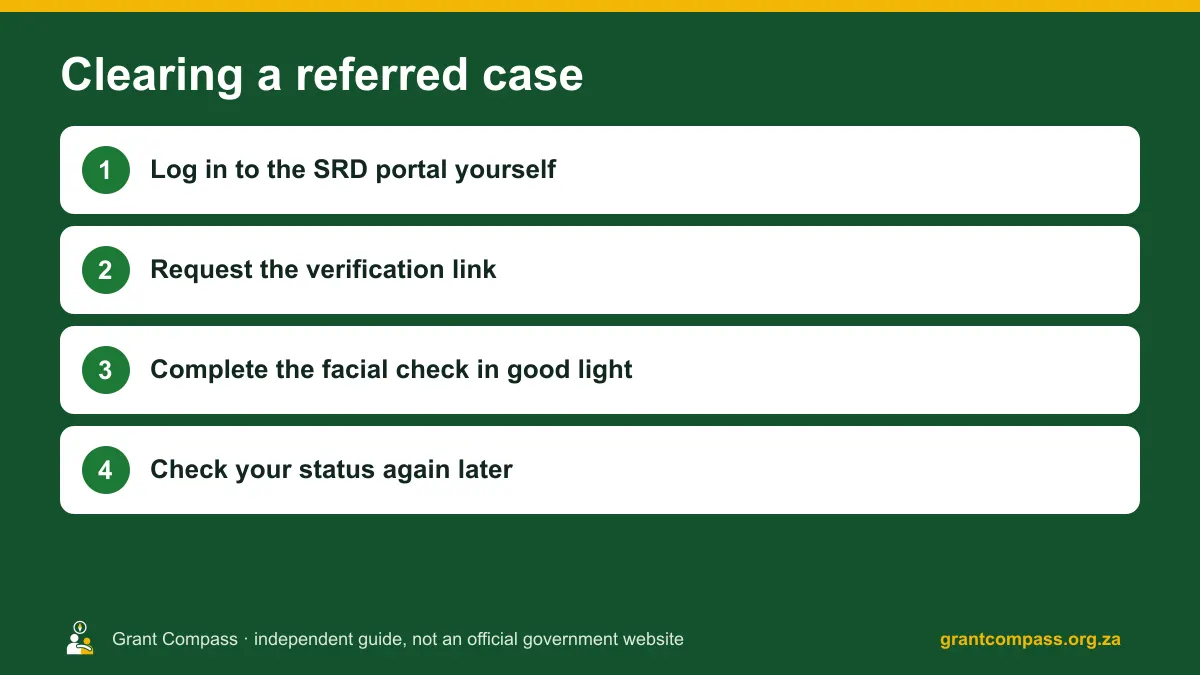
Log in to the SRD portal, request a verification link and complete the facial biometric check. This is the route SASSA's 2026 booklet gives.
- Charge your phone and make sure you have data.
- Type https://srd.sassa.gov.za into your browser yourself.
- Find your application using your ID number and registered phone.
- Request the verification link.
- Open the SMS or link that arrives on your own phone.
- Allow the camera to be used.
- Follow the prompts for your face and ID.
- Wait for the confirmation screen before closing.
- Check your status again after some days.
A verification link can expire. SASSA has spoken of acting within 72 hours, so open it promptly and ask for a new one if it lapses.
Never forward the link. The person who completes the scan must be you.
What does a failed result usually involve?
It usually means one attempt did not go through, so your task is to find which attempt. Look at where the word appears.
| Where you see "failed" | Likely area | What to try |
|---|---|---|
| After a face scan | Biometric check | Better light, steady phone, then office help |
| Next to identity wording | Details not matched | Compare with your ID and Home Affairs record |
| Next to payment wording | Money did not reach you | Check your account and details |
| Next to a code or login | The SMS code step | Wait, then request one new code |
| With no explanation | Unclear | Ask SASSA what failed |
For payment problems, follow Grant money not landing. For missing codes, see Fixes for a missing OTP.
What about null or N/A on your screen?
A blank, "null" or "N/A" entry means the page has no information to show in that space. It is not a refusal on its face. Refresh later, try another official channel, and ask SASSA if it stays that way for a month you applied for.
What if the face scan keeps failing?
Change the conditions once or twice, and then stop repeating and get help. Endless attempts rarely solve a records problem.
Try these changes:
- face a window or lamp so your face is evenly lit;
- remove hats, sunglasses and anything covering your face;
- hold the phone at eye level;
- clean the camera lens;
- use a stable connection;
- try another phone you trust, and sign out afterwards.
An old green ID book can be a cause. SASSA has said the poor quality of older photos on Home Affairs records makes a facial match harder. It advised applying for a new smart ID card if the check fails. Our Face scan help guide goes further.
What if you cannot verify on a phone?
Visit your nearest SASSA office and ask for help with identity verification. In January 2026 SASSA said its offices were equipped to assist, with kiosks, official laptops and guest Wi-Fi.
Take these with you:
- your ID card or ID book;
- the phone with your registered number, if you still have it;
- a note of the status wording and month;
- proof of any change, such as a replaced SIM.
Services can differ between offices and days. Use our Local offices guide and call ahead if you can.
What if your status stays referred?
Follow up with SASSA and ask whether your verification was recorded. A completed scan on your side does not always mean the result has reached your file.
- Wait several days after a successful scan.
- Check your status again and screenshot it.
- Call 0800 60 10 11 during working hours.
- Give the date of your scan and ask what remains.
- Email [email protected] if you need a written trail.
- Visit an office if there is still no movement.
If you do not recognise activity on your application, say so clearly. You can also report suspected fraud on 0800 701 701.
What if it changes to declined?
Then a decision has been made, and you can challenge it. Read the reason, gather proof and appeal that month, generally within 90 days.
Verifying your identity does not guarantee approval. SASSA still checks income and the other rules afterwards. The Appeal guide shows the steps. For identity-based refusals, read about Identity verification failures.
What if you see "you are not on referred status"?
That message suggests the system does not currently list your application as referred, so there is nothing to clear under that heading. This is our plain reading of the wording, not a published definition.
If you arrived there from a verification page, go back and check your actual status. You may need a different step, or none at all.
How do you stay safe while fixing it?
Only use links and pages you reached through official channels. Scammers know that people with a flagged status are anxious.
Watch for these warning signs:
- someone offers to do your face scan for a fee;
- a message asks for your bank PIN or password;
- a link arrives from a private number or unknown group;
- you are rushed with threats of losing money forever.
SASSA says it will never request your PIN. If you already shared banking information, contact your bank at once.
How do you keep track of a failed or referred case?
Keep one short record of everything you tried, with dates. It helps you explain the problem once, clearly.
Write down the month, the exact wording, each link you requested and each scan attempt. Add the reference number from every call or visit. If a staff member tells you to wait, ask until when. Return to your notes before you contact SASSA again, so you can say what has changed.
Tips for getting through verification
Preparation makes the first attempt count.
- Read before tapping. Copy the message exactly. It tells you which fix applies.
- Use your own number. Links go to the number on record. Update it properly if you no longer have it.
- Pick good light. Even daylight works best. Avoid a bright window behind your head.
- Act quickly. Open the link soon after it arrives. Old links may stop working.
- Try once more, not ten times. After a few failures, change your approach. Go to an office.
- Keep a log. Write the date of each attempt and the result. SASSA may ask.
- Check your ID document. A damaged or old ID can cause trouble. Ask Home Affairs about a smart ID.
- Leave other details alone. Do not change bank or phone details while verifying unless they are wrong.
- Check later months. One cleared flag does not decide every month. Keep looking.
Frequently Asked Questions
What does SASSA status referred mean?
It means your application has been set aside for extra verification, often because SASSA wants to rule out fraud or confirm your details. It is not a final refusal. Log in to the SRD portal, request a verification link and complete the facial check yourself as soon as you can.
What does SASSA status failed mean?
It means a step did not succeed, but the word alone does not say which step. It could relate to a face scan, identity match, code or payment. Read the surrounding wording, check your other results and fix that specific area. If nothing explains it, ask SASSA.
Is referred the same as declined?
No, referred points to a check that still needs to happen, while declined is a refusal for a month with a reason. A referred case can later be approved or declined. Complete the verification first. If a refusal follows, you can then appeal that month with proof.
How do I fix a referred SASSA status?
Go to the official SRD portal, request a verification link, and complete the facial biometric process on your own phone. Use good light and finish all the prompts. Then check your status after some days. If the link or scan fails, visit a SASSA office with your ID.
How long does a referred status take to clear?
We could not confirm a promised time frame. It can depend on whether your verification succeeds and what else SASSA is checking. Give it some days after a successful scan, then ask SASSA whether the result was recorded. Keep the date of your attempt to quote.
Why do I not receive the verification link?
The registered number may be wrong, your SIM may not be working, or the identity system SASSA relies on may be unavailable. Check signal and message storage, then request a link again later. If nothing arrives, call 0800 60 10 11 or visit an office.
Can someone else complete my face scan?
No, the facial check must be done with your own face, because its purpose is to confirm that you are the applicant. A trusted person may help you hold the phone or read instructions. Never hand your link, code or ID photos to a stranger or paid agent.
Will I lose money while referred?
Payment for an affected month may wait until verification is sorted out and the month is approved. Do not assume what will happen to a past month. Complete the check quickly, keep records and ask SASSA about any month that remains unclear after your verification succeeds.
Should I submit a new application after a failed result?
Not as a first step. A new application does not repair a record mismatch or failed scan and may complicate things. Find out what failed and follow the instruction shown. If SASSA tells you to reapply, do it through official channels with the same correct details.
Does a green ID book cause failed verification?
It can make a facial match harder. SASSA has said older photographs held by Home Affairs may be of poor quality. If your scan keeps failing and you use a green book, ask Home Affairs about a smart ID card, and ask SASSA what to do meanwhile.
Your best next step
Copy the exact wording from your screen, then do the one action it asks for. For a referred case, that means requesting your link and completing the face check today. Use the Status check guide afterwards to confirm that the result has changed.
Sources
- You and Your Grant (SASSA booklet 2026)
- SAnews: SRD grant beneficiaries urged to verify identity to avoid delays
- SASSA statement on help with biometric identity verification
- GroundUp: Why people with green ID books struggle with verification

About The Author
Michael Williams is an informational content writer focused on South African social grants, SASSA services and public assistance information.
Keep Reading