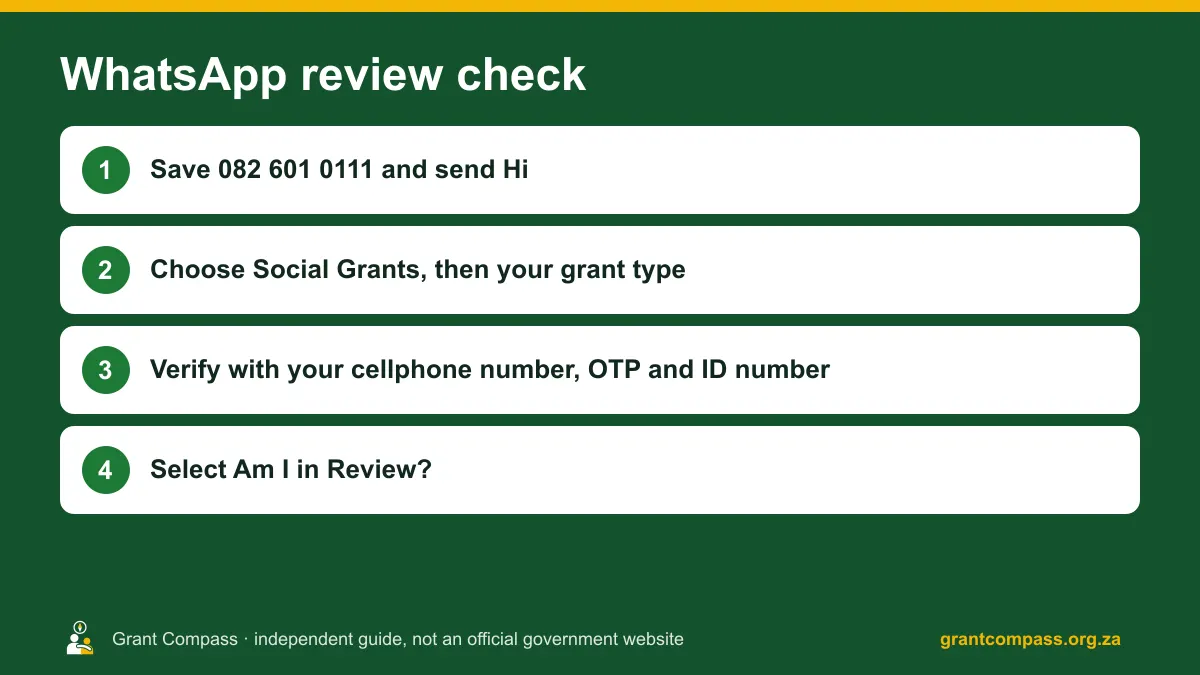
You can do a SASSA review status check for a social grant on WhatsApp, by phone or at a SASSA office. News reports give 082 601 0111 as the WhatsApp number: send Hi, pick Social Grants and choose "Am I in Review?". Use 0800 60 10 11 to confirm anything unclear.
Contents (16 topics)
- Which check matches your situation?
- How do you check your review status on WhatsApp?
- What does each reply mean?
- How can you check without WhatsApp?
- How do you check after handing in documents?
- Why does your status still show a review?
- How does a review affect your payment?
- What if your SRD status mentions a review or referral?
- What if the WhatsApp check does not work?
- What should you do in these common situations?
- How can you spot a fake review message?
- What should you do while you wait for an outcome?
- What should your review record contain?
- Tips for a calm, accurate check
- Frequently Asked Questions
- Your next step
Which check matches your situation?
Pick the line that sounds like you, because a social grant review and an SRD status are checked in different places.
| Your situation | Where to check | What you learn |
|---|---|---|
| You get a pension, disability or child-related grant | SASSA WhatsApp review option | Whether a review or proof of life is flagged |
| You handed in documents and wait | Call centre or office | Whether they were received and what is missing |
| You get the R370 SRD grant | SRD website or SRD WhatsApp | Your status for each month |
| Your payment stopped | Office, with ID and proof | The reason and what to do |
| You have no smartphone | Call centre or office | The same record, checked by a person |
How do you check your review status on WhatsApp?
Start the chat yourself, verify who you are and select the review option. These steps follow an August 2026 news report about SASSA's service.
- Save 082 601 0111 on your phone.
- Open WhatsApp and send "Hi".
- Select Social Grants on the main menu.
- Choose the grant type that applies to you.
- Confirm your cellphone number.
- Enter the one-time PIN you receive and then your ID number.
- Choose "Am I in Review?".
- Read the reply and save a screenshot.
Warning: Type your OTP and ID number only into a chat that you started with the official number. SASSA will never ask for your PIN, and no helper needs your code.
How do you know the number is genuine?
Compare it with what SASSA publishes before you type anything personal. SASSA's 2026 booklet lists a different WhatsApp chatbot number, 082 054 0016, as a general channel. If you are unsure, phone 0800 60 10 11 and ask which number to use for review checks.
Is the SRD WhatsApp number the same?
No. The SRD line is 082 046 8553 and deals with the R370 grant. Our WhatsApp number guide helps you tell the services apart.
What else is on the menu?
The August report also lists application status, frequently asked questions, upcoming payment dates and a banking details option. We could not confirm how each option works for every grant.
What does each reply mean?
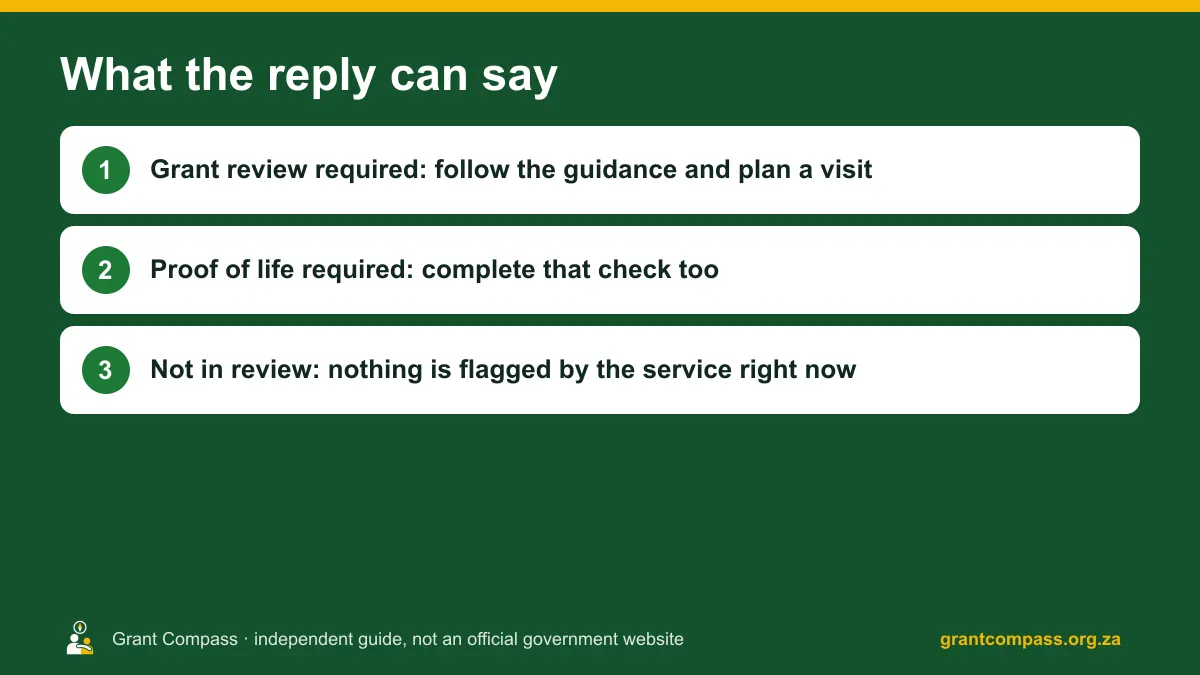
The service reportedly gives one of three answers. Each calls for a different next step.
| Reply | Plain meaning | What to do now |
|---|---|---|
| Grant review required | SASSA wants to check that you still qualify | Read the guidance, gather papers, visit in time |
| Proof of life required | SASSA needs to confirm you are alive | Complete the proof of life method offered |
| Not in review | No review or proof of life is showing | Keep your details current and check again if payment changes |
"Grant review required"
Treat this as a real task, even if no SMS reached you. Phone or visit to learn the deadline and papers. Our Review preparation guide lists what to pack.
"Proof of life required"
This is separate from a document review. The regulations say SASSA must ask beneficiaries for a life certificate every year. If the online check fails or shows a wrong record, read Fixing e-Life problems.
"Not in review"
This means the service shows nothing outstanding at that moment. It does not promise a payment, and it does not confirm that old documents were approved. If money is missing, look at other causes too.
How can you check without WhatsApp?
Phone the call centre, email SASSA or visit your local office. All three can help if you have a basic phone or no data.
- Call: 0800 60 10 11.
- Email: [email protected].
- Visit: your nearest office, with your ID and any SMS.
Before you call, write down your ID number, grant type, the date of your last payment and any reference. In an email, include your name and a short question. Do not attach bank PINs or codes.
Find a branch through our page on SASSA offices. Other ways to reach the agency are on SASSA contact details.
What if the call centre is busy?
Try again at a quieter time, send an email, or go to the office if your deadline is close. Keep a note of each attempt. A note of dates will not extend a deadline, but it helps you explain what you did.
How do you check after handing in documents?
Ask three separate questions: did SASSA receive them, is anything missing, and what is the outcome? A WhatsApp reply answers none of these fully.
| Stage | How you know you reached it | Proof to keep |
|---|---|---|
| Handed in | You gave documents to an official | Date, office and official's name |
| Received | You get an acknowledgement or reference | Receipt or photo of the slip |
| Complete | Nothing is listed as outstanding | Note of the official's answer |
| Decided | SASSA tells you the result | SMS or letter |
What should you ask before you leave the office?
Ask whether the review is complete or still waiting for something. Ask how you will hear the result and whom to contact if you do not. Request written proof that you attended.
What if you never got a receipt?
Go back or phone, and give the date, time and office. List the documents you handed in. Ask the official to check the record and give you a reference. Keep your own copies so you can supply them again if needed.
Why does your status still show a review?
The record may not be updated yet, or SASSA may still need something. We found no published processing time for a grant review outcome.
Work through these checks:
- Read your latest SMS or letter again.
- Compare it with the list of papers you handed in.
- Check whether proof of life is a separate item.
- Confirm that your cellphone number on record is correct.
- Contact SASSA and ask exactly what is outstanding.
- Visit with your receipt if the phone answer is unclear.
Do not hand in the same pile again and again without asking why. If SASSA names a missing paper, give that paper and ask for a new acknowledgement.
How does a review affect your payment?
Payment can be moved or delayed while a review is open. In August 2026, grants under review were paid on a fourth payment day, 7 August, instead of with the normal three groups. Those beneficiaries were asked to visit an office during August.
That notice was for that month. Check the current month's announcement before you travel because you did not see money on the usual day. See SASSA payment dates and Grant money not landing.
Can your grant be suspended?
Yes, if you do not respond or do not complete the review. A parliamentary reply from February 2026 says suspension is used to prompt you to come in. If you do not complete the review after that, the grant lapses.
The same reply says that when you finish the review and still qualify, the suspension is lifted and you are paid for the suspended period. Act early and do not rely on later back payment. See Getting a stopped grant back.
What if your SRD status mentions a review or referral?
Follow the instructions on the SRD service, not the social grant steps above. The R370 grant is checked month by month on its own system.
Open srd.sassa.gov.za, check each month and look for any request to verify your identity. SASSA's booklet says referred applicants must log in, request a link, update their information and complete facial recognition. You can also dial *134*7737#.
Is a review the same as a decline?
No. An unfinished check is not a final answer. If a month is declined, you can appeal that month. Read What SRD statuses mean and Failed and referred results.
What if the WhatsApp check does not work?
Most failures come from the phone, the number or the verification step. Try the simple fixes before you assume your grant has a problem.
- No reply: Check your data and that you typed the number correctly.
- No one-time PIN: Use the phone with the number SASSA has. See OTP not arriving for general signal checks.
- Old number on record: Visit SASSA to correct it.
- ID not accepted: Check every digit, then ask at an office.
- Menu looks different: Phone SASSA and ask where the review check is now.
Do not share your phone with a stranger who offers to complete it for you.
What should you do in these common situations?
Match your story to one below and follow the short plan. Each starts with a status check and ends with proof you can show.
You got an SMS but the chat says not in review
Do not ignore the SMS because of the chat reply. Phone SASSA or visit and show the message. Ask whether it is genuine and still open. The two channels may not update at the same moment, and the written deadline is what you could lose by waiting.
The chat says review, but you never got an SMS
Visit or phone to ask for your deadline and document list. Then ask the official which cellphone number is on your record. If it is an old one, have it corrected during the same visit so that future notices reach you.
You visited last month and the review still shows
Take your receipt back to the office. Ask whether the review was captured, whether a document is still missing and whether proof of life is separate. Write down the answer. If the official needs more, hand it in and ask for a fresh acknowledgement.
You are checking for a parent or grandparent
Sit together and use the phone whose number SASSA has on record. Let the beneficiary read and approve each step. Do not keep their PIN or codes for later. If they cannot take part at all, ask SASSA about a formal appointment through our Procurator guide.
You moved to another province
Phone first and ask which office should handle your review. Take proof of your new address and your ID. Ask for your record to be updated, and check that the correct cellphone number appears.
Your child grant and your own grant are both affected
Ask about each grant by name. A reply about one may not tell you about the other. Take your own papers and the child's papers on the same visit, and ask for confirmation that covers both.
How can you spot a fake review message?
A fake message usually wants money, a code or a click on an unfamiliar link. A real concern about your review can always be checked through SASSA's own channels.
| Warning sign | Safer response |
|---|---|
| Asks for a fee to clear the review | Do not pay, report it |
| Asks for your PIN or one-time code | Delete it and phone SASSA |
| Link looks odd or misspelt | Type the official address yourself |
| Says your grant ends in hours | Verify before doing anything |
| Offers to do the review for you on chat | Refuse and visit an office |
Report suspected fraud on 0800 60 10 11 or the national anti-corruption hotline, 0800 701 701. If you already shared details, tell SASSA and your bank the same day.
What should you do while you wait for an outcome?
Keep your phone on, keep your papers together and watch your next payment. Waiting does not mean you have no duties.
- Report any new change, such as a job, a move or a death in the family.
- Answer requests for extra information quickly.
- Check your bank account on payday and note the amount.
- Recheck the review option after a while and compare screenshots.
- Do not close or swap your bank account unless you need to.
A change in the amount can mean a decision was made. The regulations say that when a grant is decreased after you report a change, you must be told the reasons. You then have a 30-day period to ask for a review of that decision. Ask for the notice if you did not receive it.
What should your review record contain?
Keep one page that shows every step and date. It saves time when you speak to a new official.
- Date you first heard about the review.
- The words of the SMS or WhatsApp reply.
- Date and office of your visit.
- List of documents you handed in.
- Reference number or receipt.
- Dates of calls and the answers you got.
- Payment dates and amounts since then.
Tips for a calm, accurate check
- Check before payday panic. A look in the quiet part of the month gives you time to act.
- Screenshot the reply. Keep the date visible.
- Use your own phone. It protects your codes.
- Delete shared codes from sight. Do not forward an OTP to anyone.
- Ask one clear question. For example, "Is any document outstanding?"
- Keep your number stable. Notices go to the number on record.
- Do not trust forwarded numbers. Confirm them with SASSA.
- Ignore speed-up offers. No payment can clear a review.
- Recheck after a visit. If the reply has not changed, phone before you return.
- Help older relatives safely. Sit with them, but let them keep their PIN private.
Frequently Asked Questions
What number do I use for a SASSA review check?
News reports from August 2026 give 082 601 0111. Send Hi, choose Social Grants, verify your identity and select "Am I in Review?". Because SASSA's booklet lists another chatbot number for general use, confirm the review line on 0800 60 10 11 if you have any doubt before entering personal details.
Does "Not in review" mean my documents were approved?
No. It only shows that the service is not flagging a review or proof of life at that moment. It is not a receipt and not an outcome letter. If you recently handed in papers, ask SASSA directly whether they were received, whether anything is missing and what decision was made.
How long does a review take after I submit?
We found no official processing time. It can depend on what is being checked and whether your documents are complete. Keep your acknowledgement and watch for messages. If payment stops or you hear nothing for longer than you expected, phone or visit and ask what is outstanding on your file.
Can I check by SMS or USSD?
The *134*7737# code is for the SRD grant, not for social grant reviews. SASSA sends review notices by SMS, but we did not find an official SMS or USSD code that checks your review status. Use the WhatsApp service, the call centre or an office visit instead.
Why did I get no SMS?
Your number on SASSA's record may be old or wrong, or the message may have been missed. SASSA can only use the contact details it holds. Ask at an office which number is recorded. If a review check or a delayed payment suggests a review, act now rather than waiting for a message.
Can someone check my status for me?
A trusted person can sit with you and help you read the screens. The check uses your ID number and a code sent to your phone, so keep control of both. If you cannot manage your affairs because of illness or disability, ask SASSA about appointing a procurator formally.
Will checking my status change it?
Checking is meant to show you information, not to change it. It does not complete a review, send documents or speed up a decision. Avoid choosing options you did not mean to, such as banking changes, and leave the chat if a message asks for something you do not understand.
Is a review check different from an appeal check?
Yes. A review check shows whether SASSA wants to confirm that you still qualify for a social grant. An appeal check shows the progress of your challenge to a decision, such as a declined SRD month. They use different channels, so do not read one result as an answer to the other.
What if my status says review but my payment arrived?
Arrival of one payment does not cancel the review. SASSA has paid some people under review on a separate day and asked them to visit afterwards. Check your notice, find out the deadline and attend. Otherwise a later payment could be suspended even though the earlier one reached you.
What can I do if the answers keep differing?
Visit your local office with every screenshot, SMS and receipt. Ask for the record to be checked while you are there and write down the official's explanation and name. If the matter is not resolved, ask how to lodge a formal complaint and keep the complaint reference for follow-up.
Your next step
Send Hi to the review line today, screenshot the reply and note the date. If it shows a review or proof of life, phone 0800 60 10 11 or visit your office to confirm your deadline. For SRD, use the R370 status check instead.
Sources
- Need to check your SASSA grant? Here is the WhatsApp number, The Witness
- SASSA urges beneficiaries not to ignore SMS notifications for social grant reviews, SAnews
- SASSA reminds beneficiaries identified for review to expect payment on the fourth payment day, gov.za
- Parliamentary question NW209 on suspended grants, PMG
- You and Your Grant 2026 (SASSA booklet)
- SASSA SRD website

About The Author
Michael Williams is an informational content writer focused on South African social grants, SASSA services and public assistance information.
Keep Reading